 Skip to content
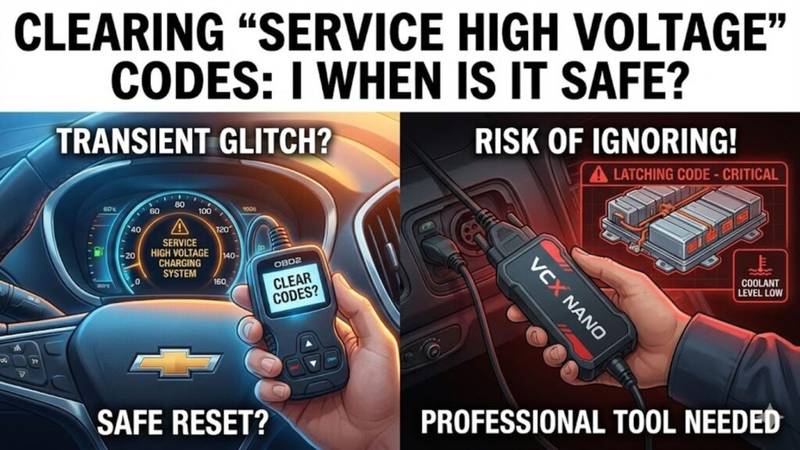
It’s the message every Chevy Volt and Bolt owner dreads. You hop in, press the start button, and there it is on the dash: “Service High Voltage Charging System.”
Your heart sinks. You plug in the charger, and… nothing. The green light doesn’t blink. The car won’t take a charge.
Before you panic and envision a $5,000 battery replacement, take a breath. In many cases, this scary message is triggered by a hyper-sensitive sensor in the coolant reservoir, not a catastrophic battery failure. However, unlike a standard “Check Engine” light, you can’t just wish this one away with a cheap code reader.
This guide will walk you through exactly what is happening, why standard tools fail to clear EV error codes OBD2, and how to safely handle the situation without getting ripped off.
The “Latching” Code: Why Your OBD2 Scanner Failed
If you already grabbed your Bluetooth OBD2 scanner and hit “Clear Codes,” you probably noticed that the error message didn’t budge.
Here is the technical reason why: The Service High Voltage Charging System (SHVCS) error is what GM calls a “latched code.”
When the Hybrid Powertrain Control Module 2 (HPCM2) detects a potential safety issue—like low coolant that could theoretically leak into the high-voltage battery—it goes into lockdown mode. It sets a permanent flag in the software to disable charging.
- Transient Codes: These are temporary glitches (like a loose gas cap on a gas car) that go away once the problem is fixed.
- Latching Codes: These are permanent lockouts. Even if you refill the coolant, the computer still thinks the car is unsafe until a specific software reset is performed.
Note: Disconnecting the 12V battery will not fix this. It might reset your radio presets, but the HPCM2 will remember the latching code.
The Usual Suspect: The Coolant Level Sensor
For the vast majority of Gen 1 (2011-2015) Chevy Volt owners, this error is caused by the battery coolant level sensor located at the bottom of the reservoir tank.
These sensors are notoriously sensitive. A dip in fluid levels (even just a few millimeters) or a momentary glitch can trigger the SHVCS message. GM actually issued a technical service bulletin (TSB) regarding this, and many owners opt to install a “Defeat Plug” (SHVCS defeat plug) which bypasses the faulty sensor with a resistor to prevent future false alarms.
However, installing the plug after the light comes on won’t turn the light off. You still have to deal with the latching code first.
Safety First: When is it Safe to Reset?
Before you attempt to reset high voltage code errors, you must perform a visual inspection. The code exists to prevent fires. If coolant is leaking into the battery pack, charging it could cause a thermal event.
Do NOT reset the code if:
- The coolant reservoir is completely empty.
- You see orange/pink fluid dripping under the car.
- You have an active P0AA6 code (Hybrid/EV Battery Voltage System Isolation Lost). This indicates a genuine high-voltage leak.
It is generally safe to proceed if:
- The coolant level is only slightly low (top it off with Dex-Cool).
- You have inspected the battery drain plug and found no fluid.
- The car drives normally in gas mode (Hold/Mountain mode).
How to Clear the Code (The Real Way)
Since a standard scanner won’t work, you have two options to get your charging back.
Option 1: The Dealership (The Easy, Expensive Way)
You can take the car to a Chevy dealer. They will use their official MDI tool to “reprogram” the HPCM2 and BECM modules.
- Pros: Guaranteed to work; they can check for actual leaks.
- Cons: Cost. Dealers often charge $150–$300 for what is essentially a 10-minute software refresh.
Option 2: The DIY Method (VCX Nano + GDS2)
If you are comfortable with computers, you can do exactly what the dealer does for a fraction of the price. This is a popular method in the maintenance DIY community.
What You Need:
- VCX Nano GM: A specialized diagnostic tool (usually around $100-$120) that mimics the dealer’s MDI interface.
- A Laptop: Windows 10 or 11 is preferred.
- ACDelco TDS Subscription: You can buy a 1-VIN subscription for roughly $40 (prices vary) that gives you access to GM’s SPS2 (Service Programming System).
The Process:
- Setup: Install the VX Manager software that comes with the VCX Nano to ensure your laptop recognizes the tool.
- Connect: Plug the VCX Nano into your OBD2 port and connect it to your laptop.
- Login: Log into the ACDelco TDS website and launch the SPS2 interface.
- Reprogram: Select “Reprogramming” and choose the HPCM2 (Hybrid Powertrain Control Module 2).
- Finish: Follow the on-screen prompts. The system will flash the module with the same (or updated) software, which effectively wipes the latched code.
Once the reprogramming is complete, the “Service High Voltage” message should vanish, and your green charging light should return.
Frequently Asked Questions
- Can I still drive my Volt with the “Service High Voltage Charging System” message? Yes. The car will usually run fine on the internal combustion engine (gas mode). However, you will not be able to charge the battery or use regenerative braking effectively until the code is cleared.
- Will a generic OBD2 scanner clear the SHVCS code? No. Generic scanners can clear standard “P” codes (like a misfire), but they cannot access the deep proprietary sub-systems of the HPCM2 to remove a latched safety code.
- How do I prevent this from coming back? Keep your coolant topped off slightly above the fill line (many owners suggest filling it to the top of the black label on the reservoir). If the sensor continues to fail, consider installing a WOT (Wide Open Throttle) Defeat Plug, which tricks the computer into thinking the level is always fine just remember to manually check your fluid levels monthly!
What to do next
If you have confirmed your coolant levels are fine and want to try the DIY fix, start by ordering a VCX Nano GM device. While you wait for shipping, top off your coolant with Dex-Cool to ensure you are ready to reset the system the moment the tool arrives.